Disclosure: As an Amazon Associate, I earn from qualifying purchases. This post contains affiliate links, which means we may receive a small commission at no extra cost to you, if you make a purchase through a link. This helps support our independent research and the maintenance of Lune & Ivory.
Creating a productive work-from-home setup in a shared family home rarely comes down to buying more things.
In most small home offices, dining-table workstations, or corner desks, the real challenge is creating a space that feels calm enough to focus in, without introducing more visual clutter.
For this guide, we evaluated products based on long-term review patterns, functionality, footprint efficiency, and how well they support intentional workspaces for busy parents and professionals.
Rather than focusing on flashy gadgets, we prioritized upgrades that quietly improve comfort, focus, lighting, and organization in compact homes. Whether you’re managing meetings before school pickup or building a side hustle after bedtime, these minimalist office upgrades help create a workspace that feels more grounded and easier to return to every day.
Looking for more curated inspiration? Check out our Father’s Day Style Guide or explore our philosophy on Intentional Living spaces need to find something to link this post to but in the future we have a a home office/studio silo that we can connect to.
How We Chose These Minimalist Office Upgrades
When reviewing products for small-space home offices, we focused on practical usability rather than trend-driven features.
Our selection criteria were built around the realities of modern, hybrid parenting:
- Space efficiency: Products needed to work well on smaller desks or shared surfaces.
- Visual simplicity: Clean designs that reduce visual noise were prioritized.
- Comfort for long sessions: Especially important for remote work and evening side projects.
- Long-term usability: We looked for products with consistent review histories and durable materials.
- Multi-functionality: Wherever possible, products that combined multiple uses earned higher consideration.
- Value relative to footprint: Every item needed to justify the space it occupies.
Quick Picks: Best Gifts for the WFH Dad
|
Category
|
Product
|
Our Verdict
|
|---|---|---|
|
Best Overall Upgrade
|
BenQ ScreenBar Halo
|
Elegant, space-saving illumination.
|
|
Best Budget Upgrade
|
Sailstar LED Desk Lamp
|
High-utility, multi-use footprint.
|
|
Best Premium Upgrade
|
Sony WH-1000XM5 Headphones
|
Unmatched noise-canceling focus.
|
|
Best Aesthetic Upgrade
|
Grovemade Wool Felt Desk Pad
|
Adds organic warmth and texture.
|
|
Best Executive Tool
|
Orbitkey Desk Mat
|
Genius hidden document storage.
|
Best Minimalist Office Upgrades for WFH Dads
Best Premium Workspace Upgrade
The BenQ ScreenBar Halo is one of those thoughtful pieces of hardware you can add to a workspace for the professionals who spend long hours at small desks. Rather than taking up precious desk space as a regular lamp would, it clips on top of a monitor and provides direct, anti-glare lighting.
It feels particularly intentional for shared home offices or side-hustle setups tucked into bedrooms and living spaces.
- Key Features: Asymmetrical monitor-mounted light bar; Wireless desktop controller; Auto-dimming sensor; Rear bias lighting; Flicker-free LED illumination.
Pros:
- Frees up desk space completely.
- Helps reduce eye strain during evening work.
- Creates a softer nighttime workspace atmosphere.
- Minimal visual footprint.
Limitations:
- Higher price point than standard desk lamps.
- Works best with external monitors.
- Rear backlight effect is subtle in brighter rooms.
- Best For: Executives, remote professionals, or side-hustlers using dual-monitor setups in low-light environments.
Why It Stands Out: Many desk lamps unintentionally add clutter. The ScreenBar improves lighting while remaining almost visually invisible once installed.
Best Minimalist Desk Foundation
Sometimes the simplest upgrade changes the overall feel of a workspace the most. The Nordik Large Felt Desk Pad helps visually anchor a desk while softening the overall environment. In smaller homes where workspaces blend into dining areas or bedrooms, details like texture and visual warmth matter more than people expect.
Key Features: Premium soft felt surface; premium non slip base; Multiple size options; Neutral minimalist tones.
Pros:
- Makes workspaces feel calmer and more intentional.
- Reduces keyboard and accessory noise.
- Comfortable under wrists.
- Ages aesthetically better than many faux leather mats.
- Great color selection
Limitations:
- Premium pricing for a non-essential item.
- Lighter felt shades can darken over time.
- Less ideal for heavy handwriting tasks.
- Best For: Parents or professionals trying to make temporary or shared workspaces feel more grounded.
Lune & Ivory Pro-Tip:
In small homes, visual boundaries matter as much as physical ones. A textured desk mat can help mentally separate “work mode” from family space, even if your office is only one corner of a living room.
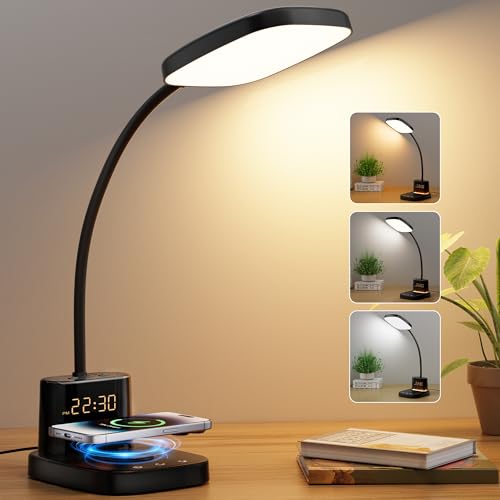
3. Sailstar LED Desk Lamp with Wireless Charger
Best Budget Multifunction Upgrade
The Sailstar LED Desk Lamp is one of the more practical multifunction desk accessories available for compact workspaces. By combining lighting, wireless charging, and storage into one small footprint, it helps reduce cable clutter without feeling overly gadget-heavy. For apartment dwellers or side-desk setups, consolidating functions often matters more than adding premium materials.
Key Features: Built-in Qi wireless charging base; Adjustable LED color temperatures; Integrated pen holder and phone stand; Stepless dimming.
Pros:
- Excellent value for smaller desks.
- Helps minimize loose cable clutter.
- Adjustable warmth for day and evening use.
- Compact enough for narrow surfaces.
Limitations:
- Plastic finish feels less premium than wood or aluminum options.
- Wireless charging placement can be sensitive.
- Light output may not suit massive executive desks.
- Best For: Small apartments, dorm-style home offices, or secondary workstations.
Why It Stands Out: Unlike many budget multifunction gadgets, this one solves practical workspace problems without overwhelming the desk visually.
Best Executive Minimalist Upgrade
The Orbitkey Desk Mat does a particularly good job of mixing organization with clean aesthetics. The hidden storage compartment is a brilliant way to keep papers, notes, and charging cables close by without leaving them out all day.
For hybrid workers who are constantly switching between digital devices and physical paperwork, that hidden storage becomes truly useful.
Key Features:
- Premium vegan leather surface
- Hidden document storage layer
- Magnetic cable holder system
- Structured and durable edges
Pros:
- Helps keep the desk looking neater.
- Hidden storage reduces paper clutter on surfaces.
- Professional but not flash.
- Practical for hybrid working patterns.
Limitations:
- Larger sizes can be too much for small desks.
- Cable magnets work best with standard thickness cable.
- The surface may acquire a few scratches over time.
Best for: Professionals with assigned office desks who want cleaner organization without bulky storage systems.
What Makes It Special: The secret drawer adds extra utility without the clutter, something many desk organizers can’t do.
Best Focus Upgrade for Busy Homes
For parents balancing corporate work calls, side projects and household activity, noise management might matter more than almost any desk accessory. The Sony WH-1000XM5 headphones still stand out for their combination of comfort, industry-leading noise cancellation, and understated design.
We feel they are especially well suited for professionals who need total focus without the aggressive, neon look that is common with gaming headsets.
Key Features:
- Best-in-class active noise cancellation (ANC)
- Light and pressure-free over-ear design
- Multipoint Bluetooth connectivity
Industry-leading microphone clarity 30-hour battery life
Pros:
- Provides instant acoustic focus in noisy environments.
- Very comfortable for long wear.
- Great for Zoom and video calls.
- Minimal clean look.
Limitations:
- High Pricing Investment
- No folding design against older generations.
- The controls for transition can feel too sensitive.
Best For: Parents in the middle of the family chaos or shared spaces
Lune & Ivory Pro Tip:
If you have a workspace that is also a bedroom or dining area, stay away from oversized desktop organizers. The hidden storage, smart cable management and vertical lighting usually make for a more calm setup with less eye strain.
Which Upgrade Matters Most?
Not every workspace has to be totally revamped. The best upgrade is often a matter of the particular sort of daily friction you want to cut down.
If your desk is cluttered: Products like the Orbitkey Desk Mat or BenQ ScreenBar Halo can help you reclaim usable surface space instantly. If household noise is distracting your concentration: The Sony WH-1000XM5 headphones are likely going to give the most obvious productivity improvement.
For the tighter budgets or temporary workstations: The Sailstar LED Desk Lamp offers strong multi-use practicality without the big investment.
For purely aesthetic tweaks: Upgrades like the Grovemade Wool Felt Desk Pad are best for those trying to make common spaces feel warmer and more intentional.
Most of the best minimalist setups are about solving one or two meaningful frustrations really well, not filling a desk with accessories.
How to Select Minimalist Office Upgrades
Minimalist office products are best when they reduce daily friction, not add to it. Before you buy, remember these tenets:
Function Per Square Inch Takes Precedence
In smaller homes, each and every item must earn its place. Most long-term value comes from products that do two things or reduce clutter.
1. Notice Visual Calm
A cluttered workspace can eventually lead to mental fatigue. Sometimes the simplest things like neutral textures, cleaner cable management and lower profile accessories can make a bigger impact than expensive tech upgrades.
2. Don’t Overdo the “Productivity”
Many work from home accessories make more upkeep than utility. Before you buy, ask yourself if the product really solves a problem you have in your daily life.
3. Consider Shared Spaces
If your office spills over into family life, portability and visual simplicity matter. Accessories age more gracefully, quietly blending in with the décor of the room.
The best minimalist office upgrades are often not the flashiest. The products that most improve the work-from-home life tend to be things that declutter, improve physical comfort and make shared spaces easier to use on a daily basis.
If you’re looking to upgrade your workspace as a whole, the BenQ ScreenBar Halo is one of the smartest space-saving upgrades you can make. If you’re on a tighter budget and have a smaller desk, the Sailstar LED Desk Lamp has a lot of functionality in a small footprint. And for busy homes and focused work, the Sony WH-1000XM5 is still the best focus upgrade for professionals.
The point is not to make a perfect, showroom office. It’s creating a space that’s quiet enough to come back to again and again.
Frequently Asked Questions
The most successful products combine functions or reduce visual clutter. Lighting that attaches to the monitor, desk mats with storage, and small multifunction lamps are all great in smaller workspaces.
1. Are expensive office accessories beneficial?
Sometimes. The premium products often upgrade the materials, longevity and visual simplicity. But the best value is generally in solving a particular recurring frustration, not buying multiple upgrades at once.
2. How can I declutter a home office?
Limit desktop accessories and use hidden storage layer systems where possible. Concentrate on reducing visible cables. Lighting quality and neutral textures also help to create a calmer environment.
3. What is important when working from home?
Comfort, good task lighting, and management of acoustic noise generally have the biggest long-term impact on productivity and daily mental fatigue.
4. Are desk mats useful?
Yes for many people. Besides helping visually organize your workspace and reducing accessory noise, desk mats can protect your furniture surface and create a clearer sense of work separation in shared living spaces.